使用社交账号登录
Still trying to get familiar with PLC programming (using OpenPLC), I started with some examples:
Some introductions about basic syntax and examples are on wikipedia, and here's an example project in OpenPLC editor, which is outputting a line of text through the serial port at the same frequence of LED blink.t
This is how the LD program looks like:
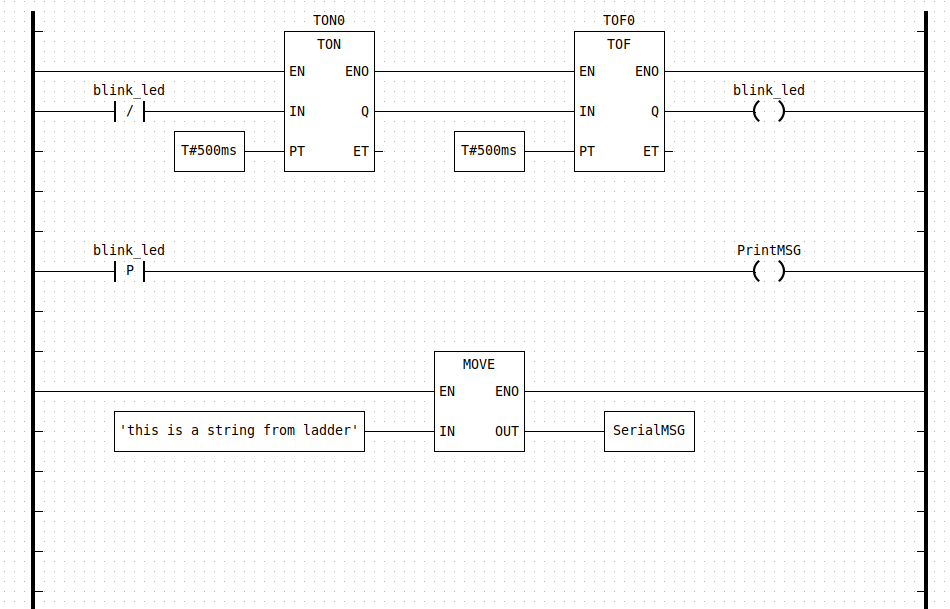
Blink LD program
There are mainly 3 parts.
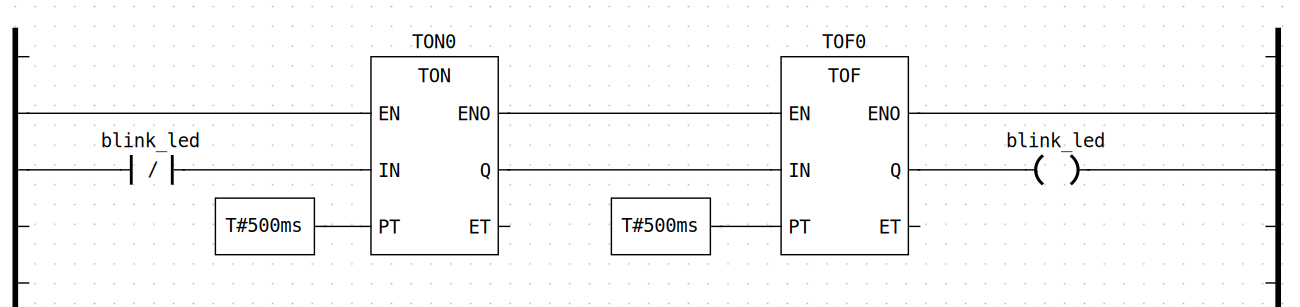
Part 1: timer + relay
This part defines the interval / frequency of LED blink. On the left there is an rung input ( or "checkercontact" in ladder diagrams) —[ ]— , it's taking the on-board LED's status as an input. TON0 and TOF0 are timer relays, what they do is to generate a high of low voltage output at the Q end according to the preset time duration.

rising edge enable PrintMSG
This part is using the rising edge of the LED pin to enable the PrintMSG function,
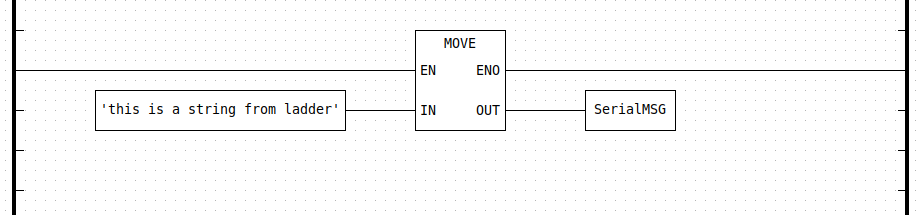
Providing string literal to the PrintMSG function
And eventually the message printing process is an arithmetic operation called MOVE , what it does is to copy the string literal from in pin to an external variable called SerialMSG on the OUT pin.
It still looks a bit confusing at this point, but there's also the Arduino side of the program:
//////////////////////////////// sketch section ////////////////////////////////
// This is the Arduino side of the project. The functions sketch_setup() and
// sketch_loop() provide the same functionality of the setup() and loop()
// functions of a regular Arduino sketch. On top of this code editor there is a
// variable table. You can add variables there that are shared between the
// arduino code and the PLC code. Since they are shared, you can, for example,
// read a sensor on the arduino sketch and use the reading in a PLC program.
// On the PLC side you must declare the same variable with the class "external"
// before being able to use it in your program.
// This Arduino sketch implementation is compatible with virtually every library
// or code you can possibly run on the regular Arduino IDE. You can create your
// own functions and also #include external libraries (as long as they are also
// installed on your Arduino IDE). The only catch is that your sketch_loop()
// function cannot block (long while loop or delays), or else your PLC code will
// block as well.
// Notes about this particular demo: Since this demo uses the serial port, you
// cannot enable Modbus Serial on your project, otherwise it will conflict with
// the messages being printed from this sketch. Also, this sketch shares a
// STRING with the PLC side. This is not a regular c-string, it is an IEC 61131
// STRING. Variables shared between the PLC and Arduino sketch are always IEC
// 61131 variables. For normal datatypes like INT, REAL, DINT, etc, there are
// direct equivalents in C (int16_t, float and int32_t respectively), so you
// shouldn't have any problems with those. An IEC STRING however is a more
// complex structure. You can typecast an IEC STRING into a c-string by using
// (char *)STRING.body as shown in the example below.
void sketch_setup()
{
Serial.begin(115200);
Serial.println("Hello World! I'm starting now...");
}
void sketch_loop()
{
if (PrintMSG)
{
Serial.println((char *)SerialMSG.body);
}
}
In this case, it's using the variables ( PrintMSG and SerialMSG ) modified in the ladder diagram in the sketch_loop function.
When the program is being build, there would be some .obj and lib files generated:
And actually the Arduino code in the previous section is in CFile_0.c:
And the Ladder Diagram was translated into C files first, it's in a file called POUS.c:
The ARDUINOPRINT_body__() contains the corresponding ladder diagram operations.
Is the compiled .so library files able to be executed on actual devices? Is it executed well in local simulator / development runtime environment?
How exactly is the compilation process executed? Is it possible to expose some internal variables or input to external entities? To what degree is the whole program configurable?
What are the possible limits for PLC programs ( if the developers want to create FMUs for these programs )? For example if some variables are supposed to be accessable by external entities rather than being private withing the FMU, would there be a guideline / to-do / not-to-do list for for the PLC programs?
Start build in /home/ray/Downloads/OpenPLC Editor for Linux/OpenPLC_Editor/editor/examples/Arduino_Serial_Print/build
Generating SoftPLC IEC-61131 ST/IL/SFC code...
Collecting data types
Collecting POUs
Generate POU ArduinoPrint
Generate Config(s)
Compiling IEC Program into C code...
Extracting Located Variables...
C code generated successfully.
PLC :
[CC] plc_main.c -> plc_main.o
[CC] plc_debugger.c -> plc_debugger.o
PLC :
[CC] Config0.c -> Config0.o
[CC] Res0.c -> Res0.o
0 :
[CC] CFile_0.c -> CFile_0.o
Linking :
[CC] plc_main.o plc_debugger.o Config0.o Res0.o CFile_0.o -> Arduino_Serial_Print.so
Successfully built.
Build MD5: 4e8dd5085880b489b8a48c8bf30f9588
/* Code generated by Beremiz c_ext confnode */
#ifdef ARDUINO_PLATFORM
#include <stdio.h>
#include "iec_types_all.h"
/* User variables reference */
extern "C" __IEC_STRING_t CONFIG0__SERIALMSG;
#define SerialMSG CONFIG0__SERIALMSG.value
extern "C" __IEC_BOOL_t CONFIG0__PRINTMSG;
#define PrintMSG CONFIG0__PRINTMSG.value
/* User sketch */
// This is the Arduino side of the project. The functions sketch_setup() and
// sketch_loop() provide the same functionality of the setup() and loop()
// functions of a regular Arduino sketch. On top of this code editor there is a
// variable table. You can add variables there that are shared between the
// arduino code and the PLC code. Since they are shared, you can, for example,
// read a sensor on the arduino sketch and use the reading in a PLC program.
// On the PLC side you must declare the same variable with the class "external"
// before being able to use it in your program.
// This Arduino sketch implementation is compatible with virtually every library
// or code you can possibly run on the regular Arduino IDE. You can create your
// own functions and also #include external libraries (as long as they are also
// installed on your Arduino IDE). The only catch is that your sketch_loop()
// function cannot block (long while loop or delays), or else your PLC code will
// block as well.
// Notes about this particular demo: Since this demo uses the serial port, you
// cannot enable Modbus Serial on your project, otherwise it will conflict with
// the messages being printed from this sketch. Also, this sketch shares a
// STRING with the PLC side. This is not a regular c-string, it is an IEC 61131
// STRING. Variables shared between the PLC and Arduino sketch are always IEC
// 61131 variables. For normal datatypes like INT, REAL, DINT, etc, there are
// direct equivalents in C (int16_t, float and int32_t respectively), so you
// shouldn't have any problems with those. An IEC STRING however is a more
// complex structure. You can typecast an IEC STRING into a c-string by using
// (char *)STRING.body as shown in the example below.
void sketch_setup()
{
Serial.begin(115200);
Serial.println("Hello World! I'm starting now...");
}
void sketch_loop()
{
if (PrintMSG)
{
Serial.println((char *)SerialMSG.body);
}
}
#endif
void LOGGER_init__(LOGGER *data__, BOOL retain) {
__INIT_VAR(data__->EN,__BOOL_LITERAL(TRUE),retain)
__INIT_VAR(data__->ENO,__BOOL_LITERAL(TRUE),retain)
__INIT_VAR(data__->TRIG,__BOOL_LITERAL(FALSE),retain)
__INIT_VAR(data__->MSG,__STRING_LITERAL(0,""),retain)
__INIT_VAR(data__->LEVEL,LOGLEVEL__INFO,retain)
__INIT_VAR(data__->TRIG0,__BOOL_LITERAL(FALSE),retain)
}
// Code part
void LOGGER_body__(LOGGER *data__) {
// Control execution
if (!__GET_VAR(data__->EN)) {
__SET_VAR(data__->,ENO,,__BOOL_LITERAL(FALSE));
return;
}
else {
__SET_VAR(data__->,ENO,,__BOOL_LITERAL(TRUE));
}
// Initialise TEMP variables
if ((__GET_VAR(data__->TRIG,) && !(__GET_VAR(data__->TRIG0,)))) {
#define GetFbVar(var,...) __GET_VAR(data__->var,__VA_ARGS__)
#define SetFbVar(var,val,...) __SET_VAR(data__->,var,__VA_ARGS__,val)
LogMessage(GetFbVar(LEVEL),(char*)GetFbVar(MSG, .body),GetFbVar(MSG, .len));
#undef GetFbVar
#undef SetFbVar
;
};
__SET_VAR(data__->,TRIG0,,__GET_VAR(data__->TRIG,));
goto __end;
__end:
return;
} // LOGGER_body__()
static inline STRING __ARDUINOPRINT_MOVE__STRING__STRING1(BOOL EN,
STRING IN,
ARDUINOPRINT *data__)
{
STRING __res;
BOOL __TMP_ENO = __GET_VAR(data__->_TMP_MOVE14_ENO,);
__res = MOVE__STRING__STRING(EN,
&__TMP_ENO,
IN);
__SET_VAR(,data__->_TMP_MOVE14_ENO,,__TMP_ENO);
return __res;
}
void ARDUINOPRINT_init__(ARDUINOPRINT *data__, BOOL retain) {
__INIT_LOCATED(BOOL,__QX0_3,data__->BLINK_LED,retain)
__INIT_LOCATED_VALUE(data__->BLINK_LED,__BOOL_LITERAL(FALSE))
TON_init__(&data__->TON0,retain);
TOF_init__(&data__->TOF0,retain);
__INIT_EXTERNAL(STRING,SERIALMSG,data__->SERIALMSG,retain)
__INIT_EXTERNAL(BOOL,PRINTMSG,data__->PRINTMSG,retain)
R_TRIG_init__(&data__->R_TRIG1,retain);
__INIT_VAR(data__->_TMP_MOVE14_ENO,__BOOL_LITERAL(FALSE),retain)
__INIT_VAR(data__->_TMP_MOVE14_OUT,__STRING_LITERAL(0,""),retain)
}
// Code part
void ARDUINOPRINT_body__(ARDUINOPRINT *data__) {
// Initialise TEMP variables
__SET_VAR(data__->TON0.,EN,,__BOOL_LITERAL(TRUE));
__SET_VAR(data__->TON0.,IN,,!(__GET_LOCATED(data__->BLINK_LED,)));
__SET_VAR(data__->TON0.,PT,,__time_to_timespec(1, 500, 0, 0, 0, 0));
TON_body__(&data__->TON0);
__SET_VAR(data__->TOF0.,EN,,__GET_VAR(data__->TON0.ENO,));
__SET_VAR(data__->TOF0.,IN,,__GET_VAR(data__->TON0.Q,));
__SET_VAR(data__->TOF0.,PT,,__time_to_timespec(1, 500, 0, 0, 0, 0));
TOF_body__(&data__->TOF0);
__SET_LOCATED(data__->,BLINK_LED,,__GET_VAR(data__->TOF0.Q,));
__SET_VAR(data__->R_TRIG1.,CLK,,__GET_LOCATED(data__->BLINK_LED,));
R_TRIG_body__(&data__->R_TRIG1);
__SET_EXTERNAL(data__->,PRINTMSG,,__GET_VAR(data__->R_TRIG1.Q,));
__SET_VAR(data__->,_TMP_MOVE14_OUT,,__ARDUINOPRINT_MOVE__STRING__STRING1(
(BOOL)__BOOL_LITERAL(TRUE),
(STRING)__STRING_LITERAL(28,"this is a string from ladder"),
data__));
if (__GET_VAR(data__->_TMP_MOVE14_ENO,)) {
__SET_EXTERNAL(data__->,SERIALMSG,,__GET_VAR(data__->_TMP_MOVE14_OUT,));
};
goto __end;
__end:
return;
} // ARDUINOPRINT_body__()