Chill, sit back and relax
Previous problems
- Is the compiled .so library files able to be executed on actual devices? Is it executed well in local simulator / development runtime environment?
- (When the OpenPLC editor is running the simulation of the PLC program) How is the simulation process executed? Understanding this could be extremely crucial for creating FMU for OSP sw. (TODO: Look into OpenPLC runtime)
- How exactly is the compilation process executed? Is it possible to expose some internal variables or input to external entities? To what degree is the whole program configurable?
- What are the possible limits for PLC programs ( if the developers want to create FMUs for these programs )? For example if some variables are supposed to be accessible by external entities rather than being private withing the FMU, would there be a guideline / to-do / not-to-do list for for the PLC programs?
And more importantly, it could be helpful to take a look into the the simulation functionalities that comes with the OpenPLC development tool, how does it work, what is simulated and what is not, the limitations, and more importantly how exactly is it implemented.
Different languages in IEC 61131-3 with example
Previously we looked at a example that runs on Arduino written by ladder diagram PLC programming langrage, and it brings several questions:
- We're not sure which language is more preferred to the users.
- Is there any difference in the generated C code between PLC programs written in different IEC 61131-3 languages? If that's the case, what are the potential limitations and drawbacks we need consider when attempting to create FMUs for them?
Fortunately, there's another example in OpenPLC editor that are composed of several units written in different IEC 61131-3 languages, and it would be easier to examine how the building blocks are composed and how they are interacting with each other in this example that contains Program Organization Units ( POUs ) in different languages.
The compile process of PLC programs in OpenPLC
OpenPLC editor uses a fair amount of legacy code of another open source PLC development tool called Beremiz ( which is also an IDE for PLC programs in IEC 61131-3 languages, and it also uses the PLC open editor and MatIEC compiler to translate the PLC programs into ANSI C code ), there's a more detailed compilation process of the PLC program from Beremiz's documentation.
PLCOpen XML project (beremiz.xml and plc.xml)
These are the initial 2 files used by the PLC open editor. The editor would save and load the PLC programs using XML markup files ( in this case plc.xml ) according to PLCopen TC6-XML Schemes [2].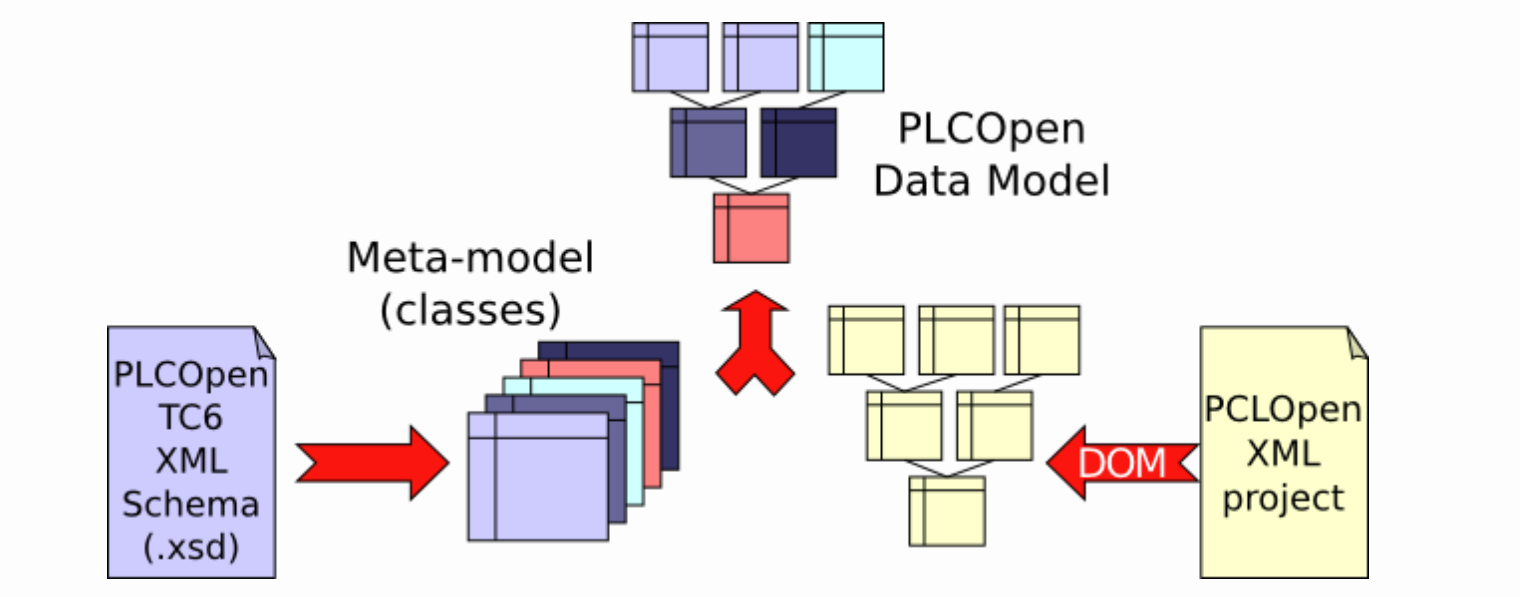
PLCOpen Editor and XML
"PLCOpen Editor and XML, source: https://beremiz.org/doc"
The PLCOpen XML project files may not exactly correspond to the DOM (Document Object Model) in web development terms, the XML files store a textual representation of the graphical PLC programs( such as the coordinate system and positions of the graphical components ), and they serve as an intermediate format that OpenPLC can interpret and manipulate.
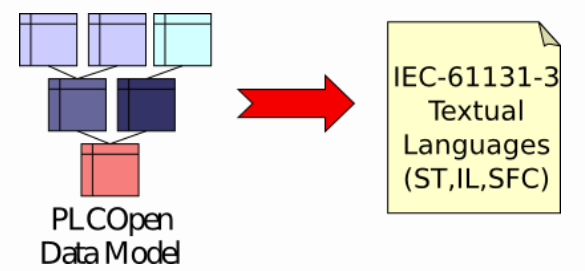
PLCOpenDatamodel to IEC61131-3 languages
The PLC open editor can parse the XML file back to the graphical representations, meanwhile it also has built-in export filter that convert graphical languages to their equivalent textual form.
PLCOpen TC6-XML XML Schema
However, the parsing process itself doesn't guarantee the correctness of the PLC program. The schema is the constrain which ensures the XML-documents are compiled in a certain well-define manner.
PLCOpen Data Model
XSLT (eXtensible Stylesheet Language Transformations)
Purpose
XSLT is used to transform XML documents into other formats or different XML structures. For example, if there is an XML file in a format specific to a vendor, an XSLT stylesheet can be applied to transform that XML into the PLCopen standard XML format used by OpenPLC. This process ensures compatibility between different PLC programming environments.
IEC to C compilation (MatIEC)
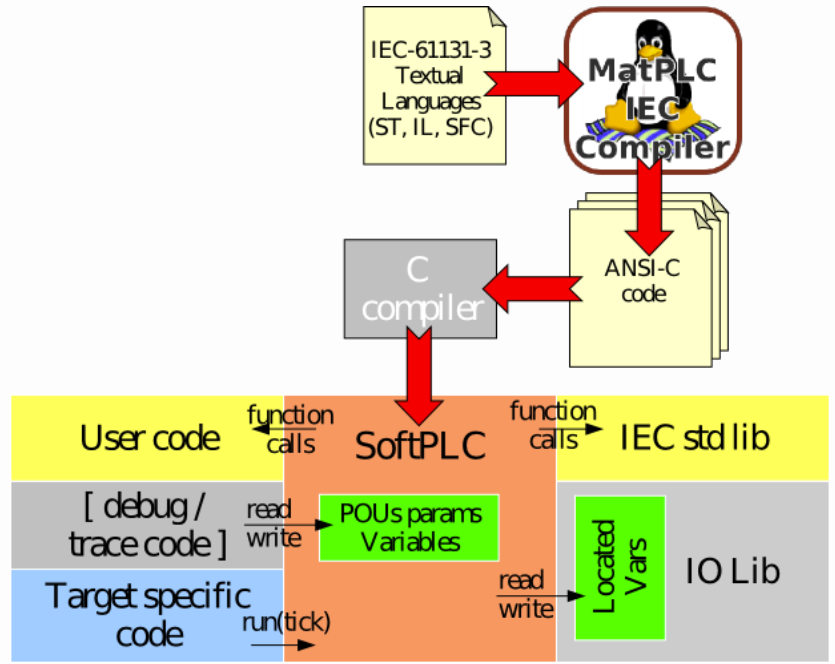
Compilation from IEC61131-3 to C program
The MatIEC works this way:
- Compiles ST/IL/SFC code into ANSI-C code.
- All POU parameters and variables are accessible through nested C structs
- Located variables are declared as extern C variables
An overview to POU (Program organization unit)
A Program Organization Unit (POU) is a fundamental concept in IEC 61131-3, one important goal of the IEC 61131-3 standard is to introduce and restrict the terminologies which referred to the building blocks of a PLC programs. POUs are the basic building blocks of a PLC program, allowing modularity, reusability, and better organization of the control logic. [4]
In the IEC-61131-3 standard, there are three types of POUs: Programs (PRG), Function Blocks (FB) and Functions (FUN).
Function (FUN)
Functions are reusable logic components that return a single value and do not retain internal state between execution cycles.They are used for small, stateless operations, such as mathematical calculations (e.g., addition, subtraction) or boolean logic (e.g., AND, OR). Functions don't retain any internal state, which also means that they are guaranteed to generate identical output by providing same input.
Function Blocks (FB)
A function block is a reusable POU that has internal state memory, meaning it can store values between cycles.
Function Blocks are similar to classes in object-oriented programming. They encapsulate specific control behaviors (like a timer, counter, or PID controller) and can be instantiated multiple times within a program or across different programs.
Unlike simple functions, function blocks have internal memory, meaning that they can retain values (such as timer values or counters) between execution cycles. This allows them to handle operations that need to maintain state, such as accumulating values over time.
In the following Multi_Language example in OpenPLC editor, all the function blocks named Counter%%% have their local (internal) variable called Cnt, which retains the state of the execution in each loop.
Programs (PRG)
The main unit where the control logic resides. A program is what the PLC executes cyclically (or triggered based on conditions) during its operation. The program is the top-level POU and is often where the primary control logic of the system is implemented. A program can call other POUs like Functions (FUN) and Function Blocks (FB).
| POU Type | Retains State | Reusability | Example Use Case |
|---|---|---|---|
| Program (PRG) | No | Main logic | Overall system logic or control sequence |
| Function Block (FB) | Yes | Reusable | Timer, Counter, PID controller |
| Function (FUN) | No | Reusable | Math operations, Logical comparisons |
How POUs work together
Programs (PRG) call Function Blocks (FB) and Functions (FUN) to implement control logic. A Function Block (FB) can be used to manage operations that need to store internal states, like a timer or a motor control routine. Functions (FUN) perform stateless operations like mathematical calculations or logical comparisons.
Multi_Language example
Here is the structure of the this Multi_Language example project: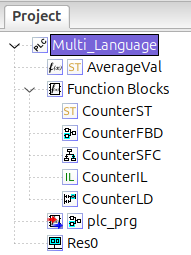
Multi_Language project structure
There's several building blocks here:
AverageVal: this is a Function (FUN) written in structural text;Function Blocks: this is a collection of several Function Blocks (FB) written in different languages;plc_prg: this is the Program (PRG) that integrates the above building blocks to perform the control logic. In terms of the hierarchy, this could also be considered as the outer-most layer of this PLC project, and its input and output can be accessed by external entities. Thisplc_prgis written in Function Block Diagram language;Res0: this unit contains the configuration of the whole project, for example the iteration of each iteration of the execution loop.
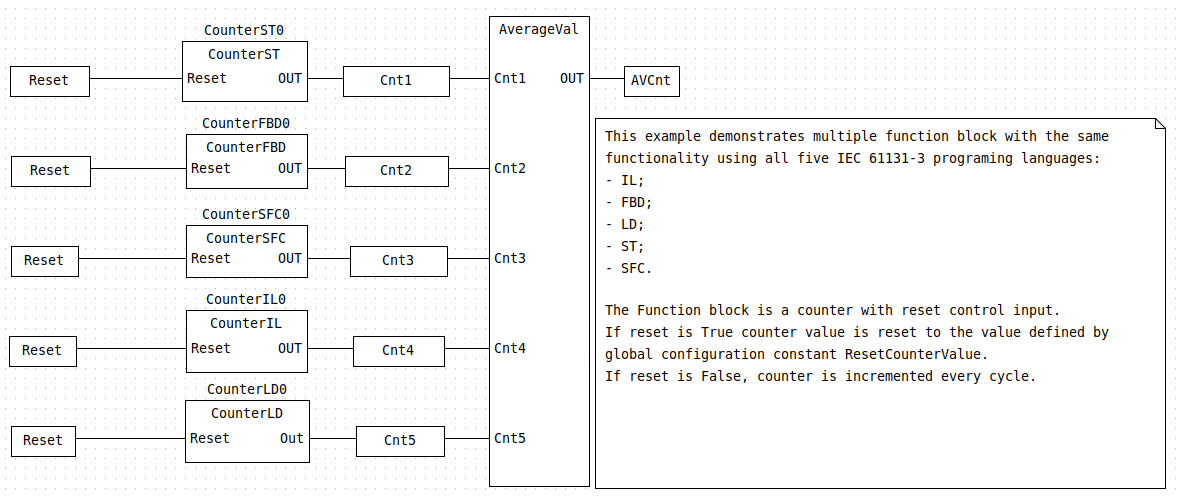
the program
The input of this application is the Reset bool signal, from this example the reset is the input to all the Counter%%% function block. What the Counter%%% does is to generate an incrementing integer value at each cycle of the PLC program, the only difference is that from the suffix the the name.
Take a look at CounterST, CounterIL and CounterLD for example, they all implement the same function, which is defining the Reset as an input and generating an incrementing integer as the output, however depending on the difference between the chosen languages, there might be some slight difference in the generated C code in POUS.c. These differences might seem subtle at this stage, however suppose we attempt to generate FMUs using these different implementations, the differences between them could potentially also lead to different details of the FMU structure or different behaviors within the FMUs.
CounterST
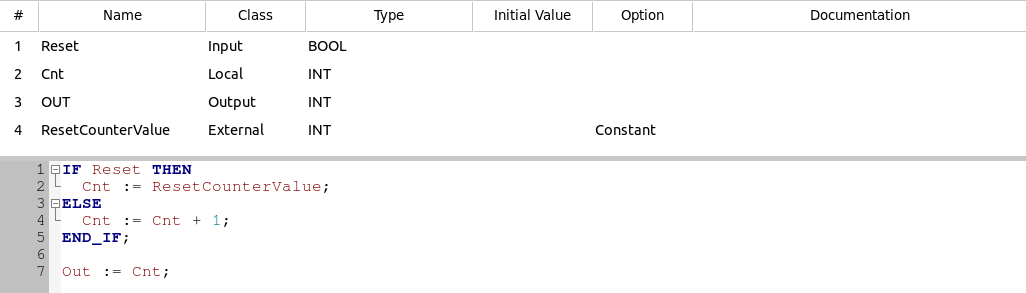
CounterST
CounterIL
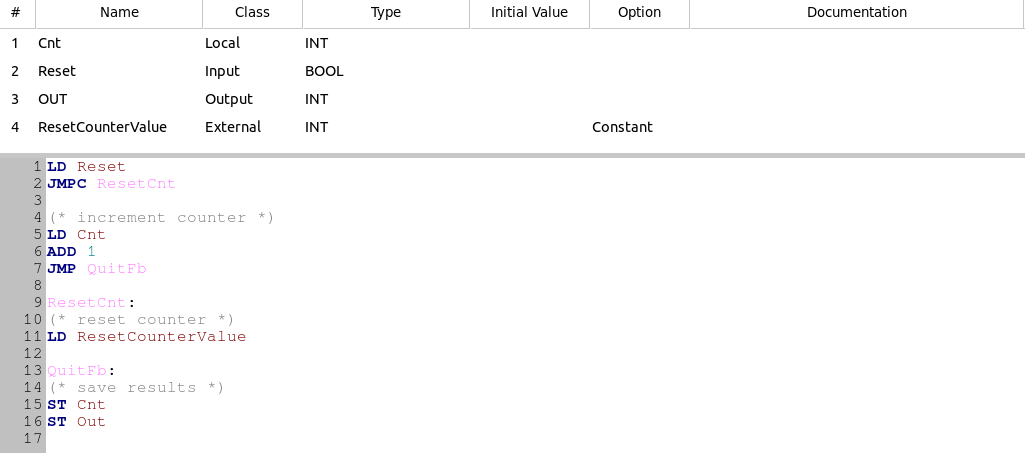
CounterIL
CounterLD
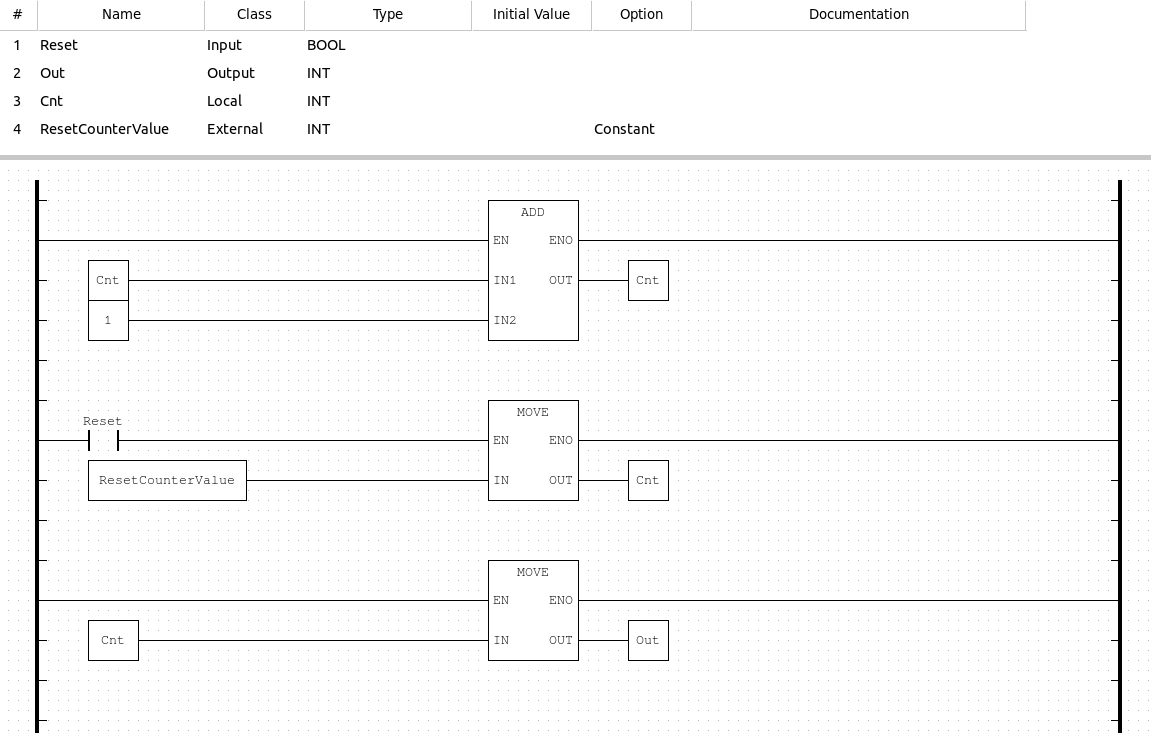
CounterLD
Difference in C code generated in POUS.c
The generated code for instruction list and structural text are rather simple, the XML markup for these 2 examples are represented as formatted text based on XHTML[3].
CounterST:
Corresponding node in plc.xml:
CodeBlock Loading...
The generated C code:
CodeBlock Loading...
CounterIL:
Corresponding node in plc.xml:
CodeBlock Loading...
CodeBlock Loading...
And CouterLD, the generated C code of the ladder diagram representation has more inline functions in the initialization part, they are corresponding to the blocks in the ladder diagram, which works as smaller function units within this module:
CodeBlock Loading...
Remaining and new questions & problems
- Is the compiled .so library files able to be executed on actual devices? Is it executed well in local simulator / development runtime environment?
- How exactly is the compilation process executed? Is it possible to expose some internal variables or input to external entities? To what degree is the whole program configurable?
- How EXACTLY is the simulation process executed? Understanding this could be extremely crucial for creating FMU for OSP sw. (TODO: Look into OpenPLC runtime)
- [NEW] This example hasn't defined any address mapping ( for any specific hardware platform ), how necessary is it to find out & what are the proper steps of doing this?
- *[NEW] I noticed the XSLT (eXtensible Stylesheet Language Transformations) in the PLCOpen XML's technical paper, it's purpose is to transform the XML provided by some specific vendor / supplier to the PLCOpen XML format that can be utilized by development tools such as OpenPLC. However I haven't figured out the priority / importance of learning more about this tool.*
- [NEW] Is it possible to remove the libraries related to OpenPLC runtime, and then build the stand-along executable PLC program?
Next Steps
- Understand the OpenPLC Runtime Code;
- Look at the Compilation Output;
- Look into & Integrate with the FMI & FMU Standard;
- Is it possible to remove the libraries related to OpenPLC runtime, and then build the stand-along executable PLC program?
References
- The documentation page of
Beremizhas some descriptions about the compiling process. (https://beremiz.org/doc) - Technical Paper PLCopen Technical Committee 6 : XML Formats for IEC 61131-3, Version 2.01 - Official release
- Technical Paper PLCopen Technical Committee 6 : XML Formats for IEC 61131-3, Version 2.01 - Official release, chapter 6.6
- IEC 61131-3: Programming Industrial Automation Systems (Sample Chapter)